CK444 Login: Access Your Account in Seconds

Your CK444 account is the key to slots, live casino, sports betting, deposits and withdrawals - all in one place. This guide covers every login method available on the platform: phone number sign-in, Facebook and Google social login, mobile app access, password recovery and account security settings. Whether you are logging in for the first time or troubleshooting a sign-in issue, you will find a clear answer here.

What Login Gives You Access To

Once you sign in to CK444, the full platform becomes available: your BDT balance, deposit and withdrawal history, active bonuses, VIP level, rebate history, missions and the reward centre. Without logging in you can browse the lobby but cannot place bets, claim bonuses or process any transactions.

The login screen is always visible at the top of the page - the blue Login button sits in the header next to Register. On mobile it appears in the same position and opens a full-screen form.

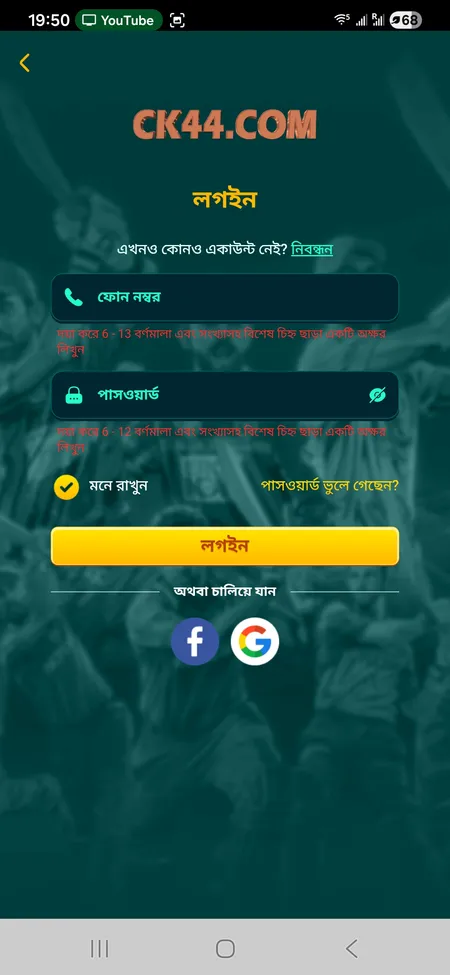
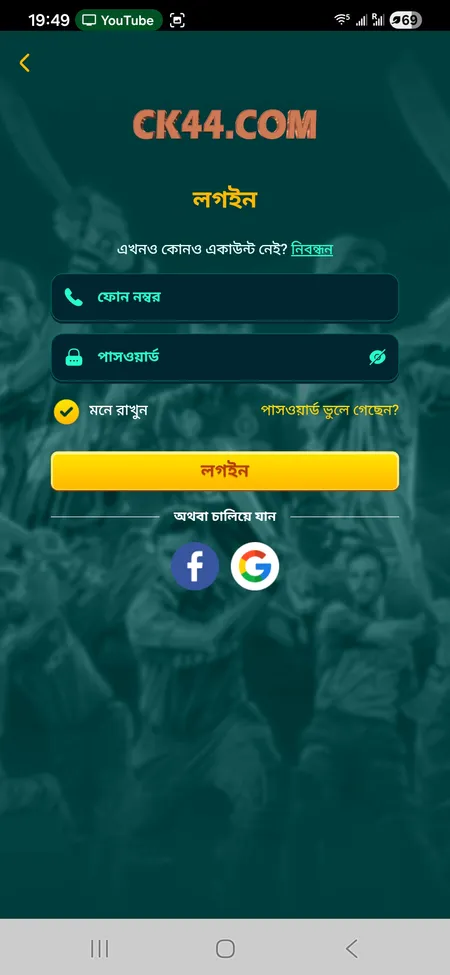
CK444 login form with phone and password fields

The standard CK444 login screen: phone number field, password field, Remember Me checkbox, Forgot Password link and social login buttons for Facebook and Google.

How to Log In to CK444 Step by Step

The sign-in process takes under 30 seconds when your credentials are ready.

  1. Open CK444 official website or the mobile app.
  2. Tap the Login button in the top-right corner of the header.
  3. Enter your registered 11-digit mobile number in the phone field.
  4. Type your password (6-12 characters, letters and digits).
  5. Tick Remember Me if you want the session saved on this device.
  6. Press the Login button to submit.

After successful authentication you are redirected to the home lobby with your BDT balance shown in the header.

Log In Now

Social Login Options: Facebook and Google

CK444 supports one-tap login via Facebook and Google. Both buttons appear directly on the login form below the standard fields. When you use social login the platform links your existing CK444 account to your social profile - no separate password is needed for future sign-ins from that device.

If you registered with a phone number and later want to add Google or Facebook as a login method, contact 24/7 support through the live chat or Telegram channel at t.me/Ck44Ofc.

Alternative CK444 sign-in screen variant

A second view of the CK444 login interface showing the social login options for faster access.

Logging In via the CK444 Mobile App

The Android APK and iOS PWA versions of CK444 use the same credentials as the web version. The app login screen mirrors the browser form: phone field, password field, Remember Me option and social login buttons.

Key differences in the app:

  • Sessions persist longer between opens (you stay signed in unless you manually log out)
  • Fingerprint or Face ID may be available depending on your device settings
  • The app caches your last session so re-entry after closing is faster

If you have not installed the app yet, visit the CK444 app download page - the Android APK is about 25 MB and installs in under a minute.

Download CK444 App

Login Form Structure

Field Details
Phone number 6-13 digit input, your registered BDT mobile number
Password 6-12 characters, mix of letters and digits
Remember Me Keeps session active on the current device
Forgot Password Opens the password recovery flow
Facebook / Google One-tap social authentication
Login button Submits the form and opens your account

The form validates input client-side before submission - mismatched field lengths are flagged immediately so you do not waste a sign-in attempt.

CK444 login works 24/7 from any device. Your BDT balance, bonus status and transaction history are always in sync across the web and app versions.

Password Recovery: Regaining Access

If you forget your password, the Forgot Password link on the login screen starts the recovery process. CK444 ties accounts to mobile numbers, so recovery goes through your registered 11-digit phone.

Steps to reset your password:

  1. Tap Forgot Password on the login screen.
  2. Enter your registered mobile number.
  3. Receive the verification code by SMS.
  4. Enter the code in the on-screen field.
  5. Set a new password (6-12 characters, must include both letters and digits).
  6. Confirm the new password and submit.

If SMS does not arrive within 2-3 minutes, check that the number you entered matches your registration number exactly. For persistent issues, the 24/7 support team can recover access - reach them via live chat, WhatsApp or Telegram.

Contact Support

Common Login Problems and How to Fix Them

Wrong Password

The most frequent issue. Check that Caps Lock is off and that you are not mixing the letter O with the digit 0. Passwords are case-sensitive. After 3 failed attempts the platform may prompt a CAPTCHA - complete it and try again.

Account Not Found

This usually means the phone number entered does not match the registered number. Try the number without the country code prefix if you registered locally. If you registered via Facebook or Google, use those buttons instead.

Page Not Loading

Clear browser cache or switch to a different network. Public Wi-Fi can block gambling domains. Using mobile data (Grameenphone, Robi, Banglalink) often resolves connectivity issues faster than shared networks.

Outdated App Version

If the APK is more than a few months old it may fail to connect. Download the latest version from the CK444 official site. Never install APKs from third-party sources - only the official page is verified.

CK444 will never ask for your password through Telegram, Facebook or WhatsApp. Any message claiming to be CK444 support and requesting your login details is a scam. Use only the official login page at CK444.COM.

Session Management and Auto-Login

When Remember Me is checked at login, the session cookie is saved for an extended period. You stay signed in even after closing the browser tab. The session ends automatically if:

  • You click Logout from the profile menu
  • The browser cache is cleared
  • The account is inactive for an extended server-defined period
  • The same account logs in from another device (depending on platform settings)

In the mobile app, sessions are preserved until manual logout. This means returning players can open the app and go directly to deposits or games without re-entering credentials each time.

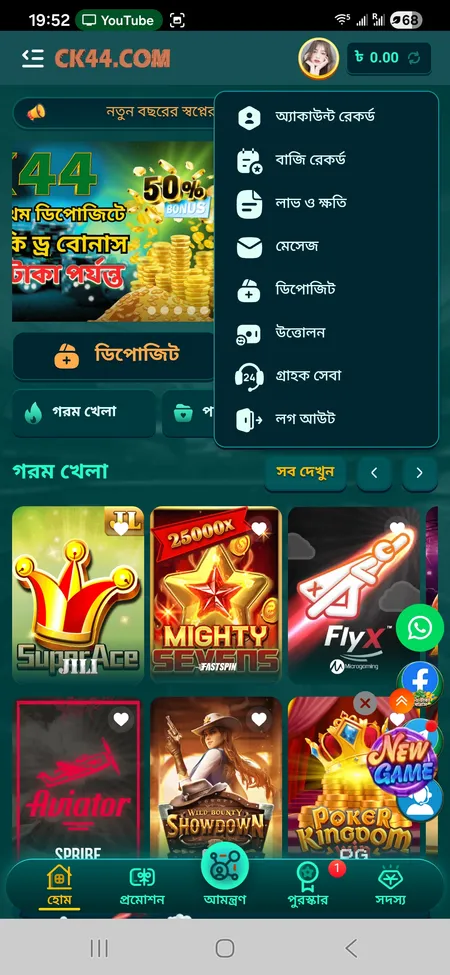
To log out manually: tap the profile icon in the header, open Account Menu and select Logout at the bottom of the list.

CK444 account menu with logout option

The profile menu inside CK444 showing account record, bet history, deposit, withdrawal and the logout button.

Account Security After Login

Protecting your CK444 account starts with a strong, unique password. Recommendations from the platform:

  • Use a password you do not reuse on other sites
  • Avoid simple sequences like 123456 or abcdef
  • Do not share credentials with anyone, including people claiming to be CK444 staff
  • Log out on shared or public devices after each session
  • Keep your registered phone number active - it is your primary recovery method

CK444 encrypts all data in transit with SSL. The platform monitors unusual login patterns and may flag sign-ins from new devices. If you receive an unexpected SMS code, do not share it and contact support immediately.

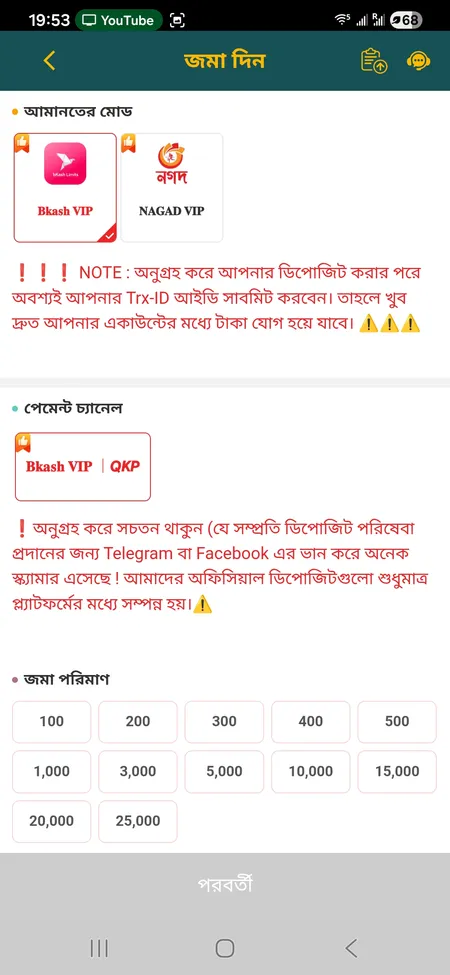
CK444 deposit form after login

Deposit After Login

Once signed in, tap Deposit in the profile menu or header. Supported channels include bKash VIP and Nagad VIP. Minimum deposit is 100 BDT. Always enter the Trx-ID from your payment app - without it the transaction is not credited. Processing takes 1-5 minutes.

CK444 bonus and promotions screen

Access Bonuses After Login

Your active bonuses and reward tickets appear in the Reward Centre. After login, tap the reward icon in the header or navigate via the side menu. New players can claim the 50% welcome bonus on their first deposit directly from this screen after signing in.

View Bonuses

Login on Different Devices

Device Method Notes
Desktop browser Web form at CK444.COM Full interface, all features
Android phone APK app or mobile browser APK recommended for faster load
iPhone / iPad PWA via Safari Add to Home Screen for app-like experience
Shared computer Web form Always log out after session ends

The CK444 interface is fully responsive. The mobile browser version is almost identical to the app, though the APK offers faster game loading and optional biometric login.

Ready to log in and start playing? Your BDT balance, bonuses and favourite games are waiting on CK444.

Frequently Asked Questions About CK444 Login

What do I use to log in to CK444?

Your registered 11-digit Bangladesh mobile number and your password (6-12 characters). You can also use the Facebook or Google login buttons if you linked a social account during registration.

I forgot my CK444 password - what should I do?

Tap Forgot Password on the login screen, enter your registered phone number and follow the SMS verification steps to set a new password. If you do not receive the SMS, contact the 24/7 support team via live chat or Telegram at t.me/Ck44Ofc.

Can I log in from both phone and PC at the same time?

CK444 accounts can be accessed from multiple devices. However, if the platform detects a new device it may apply additional security checks. Always use the official CK444.COM domain.

Why does my login keep failing?

Check that Caps Lock is off, confirm you are using the correct phone number and verify the password. If the issue persists, clear your browser cache, try a different network or update the app to the latest version.

Is the CK444 app login different from the website?

No - the same phone number and password work on both. The app saves your session longer and may support fingerprint or Face ID login depending on your device.

How do I log out from CK444?

Tap the profile icon in the header, open the account menu and select Logout at the bottom of the list. On the app you can also clear the session by uninstalling and reinstalling.

What is the Remember Me option on the login form?

Checking Remember Me saves your session cookie so you stay signed in even after closing the browser. Do not use this option on shared or public devices.

Can I change my CK444 login phone number?

Phone number changes require identity verification. Contact the 24/7 support team through live chat, WhatsApp or Telegram to request this change.

Is it safe to log in on mobile data in Bangladesh?

Yes. CK444 uses SSL encryption for all connections. Mobile data on networks like Grameenphone or Robi is generally more reliable than public Wi-Fi for accessing the platform.

What happens if someone else logs into my account?

Change your password immediately using the Forgot Password flow and contact support. CK444 can review login history and apply security measures to your account.

Final Note on CK444 Login

A correctly configured login takes under 30 seconds and gives you full access to every feature the platform offers: games, sports betting, live casino, deposits in BDT via bKash and Nagad, and the VIP reward programme. Keep your registered phone number active, use a strong unique password and always sign in through the official CK444 website or the verified APK. For any access issue, the 24/7 support team resolves most problems within 2-5 minutes.